ABHA Card 2026 — Ayushman Bharat Health Account, Apply Online in 5 Minutes
ABHA Card 2026: Get your free 14-digit Ayushman Bharat Health Account ID online via Aadhaar in 5 minutes. Benefits, eligibility, ABHA app, hospital linking, privacy controls — full guide.
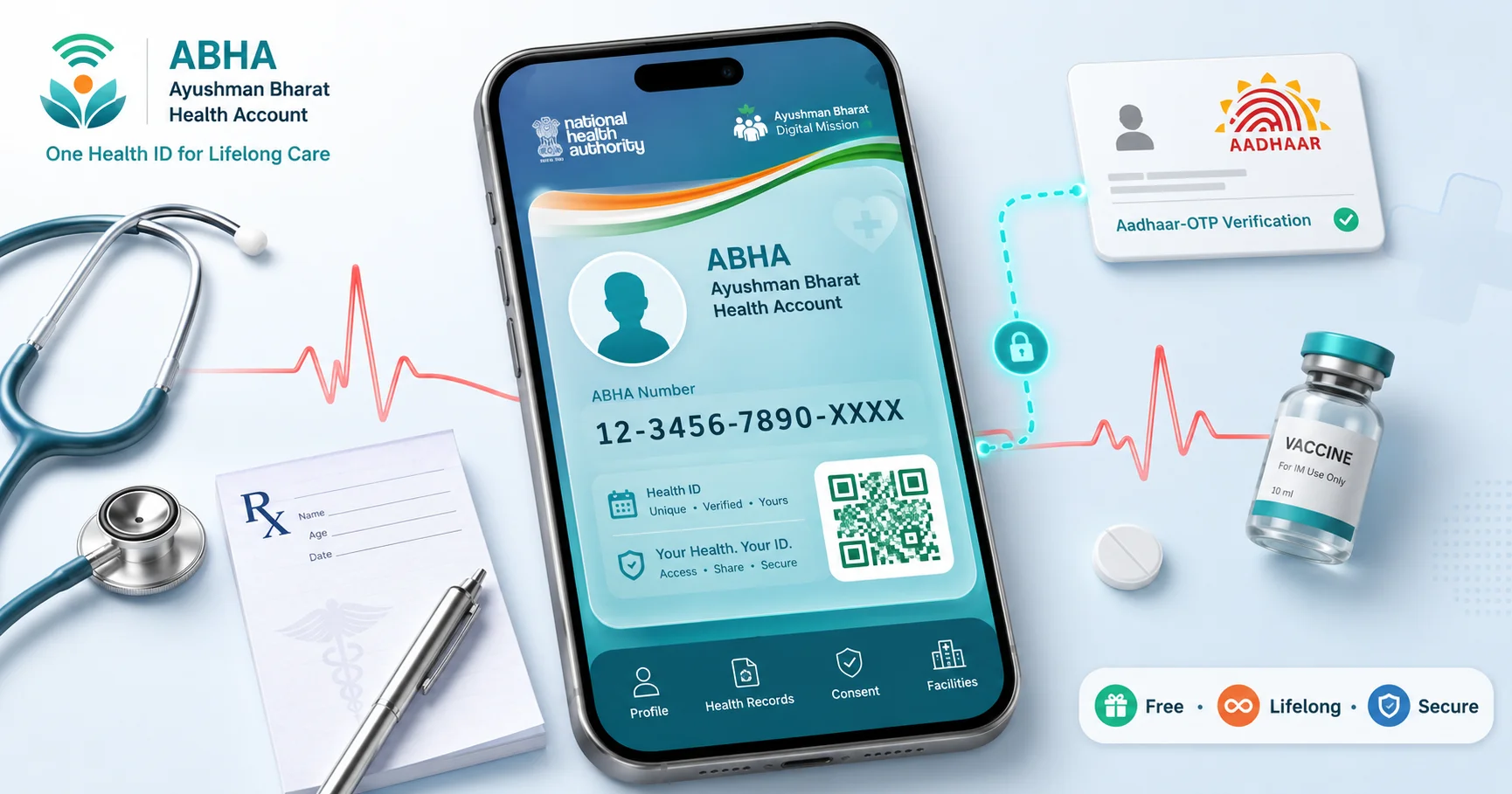
Table of Contents ▾
Quick summary. ABHA (Ayushman Bharat Health Account) is a free 14-digit unique health ID issued by the National Health Authority under the Ayushman Bharat Digital Mission (ABDM). It lets you store, access and share your medical records — prescriptions, lab reports, discharge summaries, immunisation records — securely across any ABDM-linked hospital, lab or clinic in India. Apply mode: Online in under 5 minutes via abha.abdm.gov.in using Aadhaar OTP or driving licence. Free download as PDF or in the ABHA mobile app. Not the same as the Ayushman Bharat (PM-JAY) ₹5 lakh insurance card.
ABHA is the digital backbone of India’s modern health stack — a portable, lifelong health identity that is to medical records what UPI is to bank payments. Launched on 27 September 2021 under the Ayushman Bharat Digital Mission, ABHA replaces the chaotic mess of paper prescriptions, scattered lab PDFs and lost discharge summaries with a single secure ID that doctors and patients can pull up instantly.
The ID is free, voluntary, consent-based, and revocable — you control who sees what, for how long. Crucially, ABHA is not insurance. It does not pay your hospital bills. It is purely a health-record identifier. The ₹5-lakh-cover card you may have heard of is the Ayushman Bharat PM-JAY card, which is a separate scheme for low-income families (covered in our dedicated Ayushman Bharat Card guide).
ABHA at a glance
| Detail | Information |
|---|---|
| Full name | Ayushman Bharat Health Account |
| Issued under | Ayushman Bharat Digital Mission (ABDM) |
| Issuing authority | National Health Authority (NHA) |
| Launched | 27 September 2021 |
| Cost | ₹0 — free, lifelong |
| ID format | 14-digit ABHA Number + alphanumeric ABHA Address (e.g., yourname@abdm) |
| Apply mode | Online via Aadhaar OTP, driving licence, or ABHA app |
| Time to issue | 2–5 minutes (instant) |
| Validity | Lifelong |
| Eligibility | All Indian residents (any age) |
| Official portal | abha.abdm.gov.in |
Who is eligible?
Educational Qualification
Not applicable
Age Limit (As on Date of registration)
0 to 120 Years
Other Requirements
- Nationality: Resident of India
- Open to every resident of India — there is no income, employment or BPL filter
- Children below 18: parent/guardian creates the ABHA in the child's name and links it to their own ABHA
- Senior citizens, disabled persons, persons without Aadhaar can use driving licence as the alternate ID
- NRIs holding an Aadhaar can also create an ABHA
- It is voluntary — no service or scheme can be denied for not having ABHA
In simple terms. Anyone with an Aadhaar (or driving licence) can create an ABHA in five minutes from their phone. There is no waiting list, no verification queue, no fee.
What benefits do you get?
| Benefit | What it means in practice |
|---|---|
| Single 14-digit health ID | Carry one number instead of a folder of files; usable at every ABDM-linked facility |
| Digital health locker | All prescriptions, lab reports, scans, discharge summaries stored in your ABHA — accessible on the app |
| Consent-based sharing | Doctor can see your records only after you approve a one-time consent (via OTP / app pop-up) |
| Faster hospital check-in | Scan ABHA QR at OPD — patient registration auto-fills, no re-typing demographics |
| Easier insurance claims | Insurer can verify reports directly from ABHA (with consent), reducing claim turnaround |
| Tele-consultation | Use the e-Sanjeevani / private apps with ABHA pre-fill |
| Smoother referrals | Specialist receives your full history with one consent-share — no carrying X-rays |
| Privacy & revocability | Revoke consent any time; delete or de-link your ABHA whenever you want |
Privacy note. Your records are not stored on a single government server — they remain at the originating hospital/lab and are pulled on demand against your consent. ABHA is the index, not the database.
Documents required
While filling online form
- Aadhaar card linked to active mobile number (preferred — fastest path)
- OR Driving Licence + active mobile number (if you don't want to use Aadhaar)
- Active mobile number for OTP
- Email ID (optional but recommended for record sharing)
No PAN card, no income proof, no caste certificate, no photograph required.
How to apply for ABHA online (Aadhaar method)
Step 1 — Open the official portal
Go to abha.abdm.gov.in → click Create ABHA Number. (Or download the ABHA app by NHA from Play Store / App Store.)
Step 2 — Choose verification method
Select Aadhaar (recommended, instant) or Driving Licence (alternate). For Aadhaar:
- Enter your 12-digit Aadhaar number.
- Tick the consent checkbox confirming you authorise UIDAI verification.
- Click Next.
Step 3 — Aadhaar OTP
An OTP is sent to the mobile number registered with your Aadhaar. Enter it.
If your mobile is not linked to Aadhaar, switch to Driving Licence flow or visit any ABDM-empanelled hospital / CSC for assisted enrolment.
Step 4 — Mobile verification
Enter your current active mobile number. A second OTP confirms it. (This can be different from your Aadhaar mobile.)
Step 5 — Choose your ABHA Address
This is your readable health-ID handle, like a UPI VPA — for example, priya.singh@abdm. Pick something easy to remember. You can change it later, but only once.
Step 6 — Download
ABHA is generated instantly. You see a 14-digit number + your chosen address + a QR code. Download the PDF or save it inside the ABHA app — that’s your card.
⏰ Last Date: Open (no last date — voluntary, lifelong)
Create ABHA at abha.abdm.gov.inClicking this button will take you to the official government portal.
How to link existing health records to ABHA
- Open the ABHA app → log in with ABHA Address + OTP.
- Tap Health Records → Link facility.
- Search for the hospital / lab / clinic by name or PIN code (must be ABDM-registered).
- Enter the patient ID / OPD number issued by that facility. Approve the consent.
- Records sync to your ABHA in 1–48 hours.
Sharing records with a doctor
- At the OPD reception, show your ABHA QR (from the app).
- The hospital’s HMIS pulls your demographics + sends a consent request to your ABHA.
- You approve on the app — the doctor’s screen now shows your past records for the time window you chose (e.g., 1 day, 1 week).
- Consent expires automatically; you can revoke it earlier from the app.
Common issues and fixes
| Issue | Fix |
|---|---|
| OTP not received on Aadhaar mobile | Check if mobile is still linked at uidai.gov.in → Verify Mobile/Email; if changed, update Aadhaar first |
| ABHA Address already taken | Try a variation — add a number or middle initial; address must be globally unique |
| Hospital not visible in linking list | The facility hasn’t joined ABDM yet; ask them to register at abdm.gov.in/register |
| Duplicate ABHA created accidentally | Use De-link / Delete ABHA in the app to remove the unused one |
| Records not syncing after linking | Refresh the link; some hospitals push records only at discharge, not at OPD |
Frequently asked questions
1. Is ABHA card the same as Ayushman Bharat ₹5 lakh insurance card?
2. Is creating an ABHA card free?
3. How long does it take to get an ABHA number?
4. Can I create an ABHA without Aadhaar?
5. What is the difference between ABHA Number and ABHA Address?
6. Are my health records visible to the government?
7. Can I delete or deactivate my ABHA?
8. Is ABHA mandatory for hospital admission or insurance?
9. Can I create ABHA for my child?
10. Will ABHA work in private hospitals or only government ones?
Latest updates (2026)
- ABHA-linked insurance claims: As of 2026, leading insurers (Star Health, HDFC Ergo, Niva Bupa, ICICI Lombard) accept ABHA-shared records for cashless pre-authorisation, cutting average TAT from 4 hours to 45 minutes.
- Pharmacy integration: Over 8,000 pharmacies are ABDM-linked; e-prescriptions can be sent directly from doctor’s HMIS to your ABHA, and the pharmacy fulfils against the QR.
- Vaccination & immunisation: All CoWIN vaccination certificates and routine childhood immunisation records issued at government facilities are auto-linked to ABHA from January 2026 onwards.
- ABHA app v3: New release adds offline QR display, regional-language UI in 12 languages, and accessibility modes for visually impaired users.
Official links
Disclaimer. SarkariBaba is an independent information publisher. We are not affiliated with the National Health Authority. ABHA is fully free — never pay anyone for the registration. Always verify the most current ABDM features and privacy policies at abha.abdm.gov.in.